
Collecting & grading
How to Catalog a Magic Card Collection Without Losing Printings
Record the set, collector number, language, and finish of each Magic card you own so reprints, foils, and foreign copies stop disappearing into a pile.
A collection becomes useful when you can answer two questions quickly: which physical printing do I own, and where is it? Record the printing, quantity, condition, and location as you put cards away. That turns a box of names into an inventory you can search, audit, and update after the next trade.
Cataloging starts with cards in hand. The marketplace-listing guide helps decode a listing before you buy, while the Magic card condition guide handles wear. Keep those decisions separate from the inventory record.
A card name is not an inventory key
“Lightning Bolt” identifies a game object, not the piece of cardboard in your binder. Reprints can differ by set, collector number, language, finish, frame, and treatment. Your inventory needs the physical printing.
Scryfall’s card-object documentation (opens in a new tab) distinguishes an oracle_id, which groups reprints of the same game object, from printing-level fields such as set, collector number, language, and finish. Use Oracle identity for a broad count such as “how many copies of this card do I own?” Use printing fields for the row that tells you which copy you can find.
Four fields do most of the work:
- Set code: The short code printed or represented by the set, such as
leaormh3. The Scryfall search reference (opens in a new tab) supportsset:ands:. A code is safer than a remembered set name because promotional and Commander printings may live in different sets. - Collector number: The printing’s identifier within the set. For modern cards, distinguish the exact printed information line (such as
042/063) from the normalized collector number used in Scryfall’scn:lookup: search uses the number itself (e.g.cn:42), including letters or symbols where applicable (such as promo letters, variant suffixes, or stars) but excluding the set-total denominator. Double-faced cards are the exception to the letter rule: Innistrad Delver of Secrets prints51a/264on the front and51b/264on the back, and both faces normalize to the shared lookupcn:51. Sets released before Exodus in 1998 print no collector number at all; for those cards, record the reference number Scryfall assigns to the printing (such as161for Alpha Lightning Bolt), which is a lookup key rather than something you can read off the card. Combineset:andcn:when checking a match. - Language: Record it instead of assuming English. Language can distinguish two otherwise similar copies.
- Finish: Record
nonfoil,foil,etched, or another listed finish. A foil checkbox that cannot distinguish traditional and etched finishes will merge cards that should remain separate.
Add notes for borderless or showcase treatments, promo stamps, serialized numbers, signatures, alters, or misprints. They share an underlying printing identity but are different physical copies for handling, location, and condition.
Here is the test: if you can write “one foil Lightning Bolt” and still cannot tell which set, number, or language it is, the row is not specific enough. A record such as STA / 42 / English / foil / borderless can lead you back to the English Mystical Archive copy. STA / 105 / Japanese / foil / borderless is a different row even though the name is still Lightning Bolt.
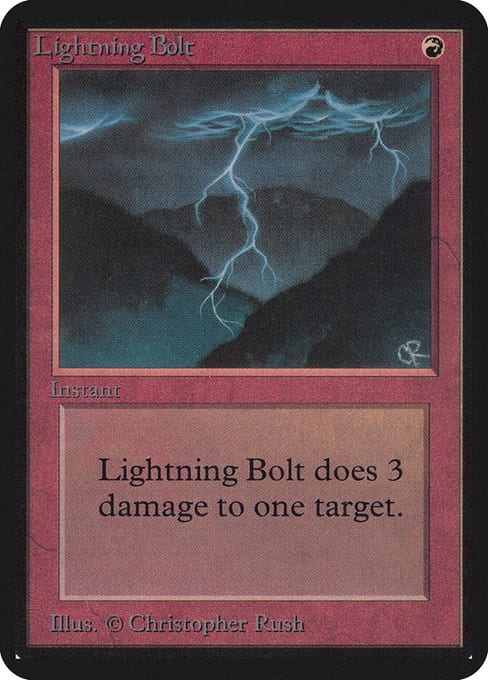
Limited Edition Alpha, set lea, English nonfoil, 1993 frame. Nothing is printed at the bottom edge, so collector 161 comes from the reference catalog rather than the card. 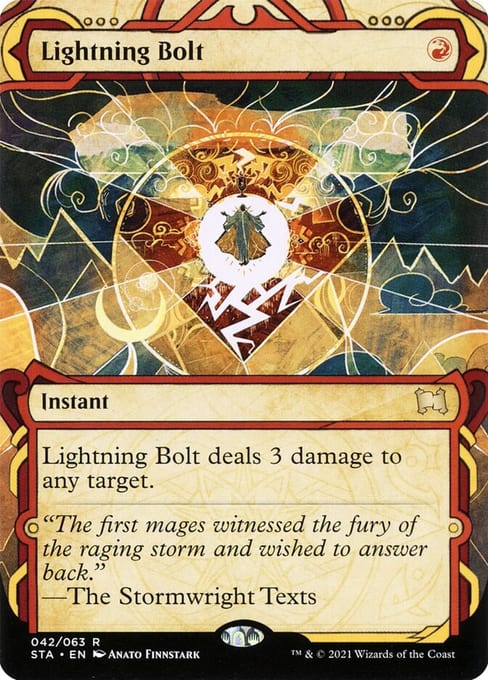
Strixhaven Mystical Archive, set sta, collector 42 (printed on the card as 042/063), English, borderless, art by Anato Finnstark. This printing exists in nonfoil, foil, and etched. 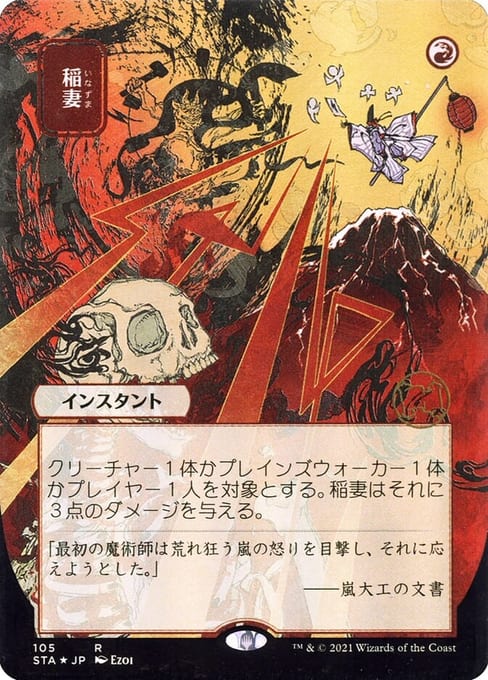
The Japanese Archive printing: set sta, collector 105, printed name 稲妻, and a different illustration by Ezoi. Language, number, and art all changed.
Choose a system you will keep open
A simple spreadsheet is often the most portable choice. Use columns for:
- Card name
- Set code
- Collector number
- Language
- Finish
- Quantity
- Condition
- Location
- Notes
- Optional Scryfall ID or URL
Keep condition separate from identity. Two copies of the same printing may need separate quantity lines if one is Near Mint and another is Moderately Played. The condition guide can help you choose and apply a consistent vocabulary.
A collection app can speed up scanning and printing lookup. Check how it treats decklists, trades, foil variants, and exports before you commit to it. The Dragon Shield FAQ (opens in a new tab), for example, explains that its Card Manager collection and deck lists are separate. Adding a copy to a deck does not automatically put that copy in the collection. That distinction is easy to miss and explains many phantom copies.
A small set-by-set collection can use a written binder index. Add page numbers and keep the index in the binder. The system gets fragile as soon as cards move between several binders and boxes.
Back up the file or export the app. A second copy is part of the catalog, not an optional technical project. A phone that breaks should not erase your location map.
Ingest cards in the same order every time
The order matters because it stops a name match from becoming a false count.
- Identify the printing. Read the set symbol and collector number from the card. When the number is hard to read, use the card name, rules text, and art to narrow the search, then compare the result with the card in hand. Use Scryfall’s
unique:printssearch (opens in a new tab) when you need to compare printings. - Confirm language and finish. Tilt the card under a good light. Foil glare and etched texture are easy to miss under a warm desk lamp.
- Assign a location immediately.
Binder 2, page 4orMH3 box, row 2is enough if that label exists on the container. - Record condition separately. Use one grading vocabulary consistently. Do not hide condition in a name such as
LP Bolt. - Count copies last. Split quantity by printing and condition when needed. Counting before identification is how reprints disappear into one row.
When a card moves into a deck, trade binder, or a different box, change its location the same day. A catalog that knows a card exists but not where it lives has only done half the job.
Sealed product is not a pile of unlogged singles. Record a sealed booster box as sealed product. Create card rows after opening it.
Let the physical order do one job well
Choose a physical order that matches how you search:
- Set, then collector number: easiest to check against a set list and the best default for set builders.
- Color, then name: quick for deck building and slower for completion checks.
- Use: decks, trade binder, and bulk together. This is convenient, but location updates become essential because cards move more often.
Do not sort a storage box by current price. Prices change while set codes and collector numbers remain useful. Leave room in binders and boxes. A little space makes the next addition possible without moving a whole section.
Use a location code that describes the physical path. Binder 2 is better than trade binder if you own several. Box C / blue bulk / row 3 beats bulk somewhere in the closet. Put the code on the container and in the catalog.
An inventory review can be small. After a trade or purchase, log those cards before they reach the long-term box. Once a month, sample one box and compare a handful of rows with the cards. If the locations disagree, fix the moving habit instead of merely correcting the sample.
Handle the exceptions deliberately
Identical names and reprints: Keep set code and collector number in every row. A Commander copy, Secret Lair copy, and main-set copy can share a name without sharing an inventory identity.
Tokens and emblems: They have their own set information. Log them when they matter to your collection, or decide once that you do not track them. Half-tracking makes the catalog hard to trust.
Oversized cards: Record the printing and note the nonstandard storage location. Do not hunt for an oversized card in a regular nine-pocket binder.
Signed, altered, and misprinted cards: Keep the underlying printing fields and describe the change in notes. Do not create a fake set code to make the record look unique.
Cards you do not want to handle: Photograph the collector number and use the photograph while entering the row. Do not flex a card in bad light to read it.
Digital-only printings: Filter a paper inventory with Scryfall’s game:paper search (opens in a new tab). Arena-only versions should not appear as cardboard in the closet.
Test the record before the card moves
Before a new arrival leaves the sorting surface, make its row answer five questions:
- Which printing is it? Record set code, collector number, language, and finish. Keep altered, signed, or unusual details in notes rather than inventing an identity.
- How many are there, and in what condition? Count only after identifying the printing, and split rows when condition differs. Keep sealed product separate until it is opened and digital-only cards out of a paper inventory.
- Where can I retrieve it? Assign a labeled binder, deck, box, and row that you can walk to now. Create an empty section or box row before a new set arrives so those cards already have a destination.
- What changed? Update the location before shuffling a card into a deck, and reduce the quantity when a trade or sale leaves the house.
- Could I recover this record? Export or back up the catalog somewhere other than the phone or computer holding the working copy.
Use the same test on one random existing row each month. If the card and record disagree, repair the handoff that allowed the move to go unlogged, not just that row.